
Introducing Custom Player Rating Models in Just Play’s Front Office Suite
It’s March.
The conference tournaments are running. You’re watching a guard who just dropped 24 points on a top-four seed — efficient, composed, the right size for what you run. And the thought crosses your mind: he might be available.
You open a tab. Pull up a data service. Cross-reference another one. Open a spreadsheet you’ve been building since January. Somewhere in that mess is the answer to whether this kid is actually a fit — statistically, stylistically, culturally. But the tools weren’t built to talk to each other, and the ratings you’re being handed were built for every program, which means they were really built for none of them.
The transfer portal opens in a few weeks. And the programs that are going to win it aren’t the ones who scramble when it does. They’re the ones who already know exactly who they’re calling.
The programs that win the portal built their boards before it opened.
The Problem with Getting Handed a Rating
Evaluation services have been a fixture in college basketball for years. They provide data, generate rankings, and give coaches a starting point. For many programs, they’ve been genuinely useful.
But there’s a structural limitation baked into every one of them: the formula isn’t yours. The weights were decided by someone else. The methodology is either opaque or fixed. You can look at the number, but you can’t touch it — and you certainly can’t make it reflect the fact that your system demands a specific kind of ball-handler, or that defensive activity matters twice as much to you as it does to the program down the road.
A rating built for every coach is, in a meaningful sense, built for none of them.
The best front offices in the country have always known this. They’ve been building their own models in Excel for years — pulling from multiple data sources, assigning their own weights, running their own filters. It works. But it’s manual, fragmented, and expensive in the one thing staffs don’t have enough of: time.
Your Model. Your Weights. Your Roster.
Just Play’s Front Office Suite now gives every program the ability to build their own custom player rating models — directly inside the platform, connected to everything else they’re already using.
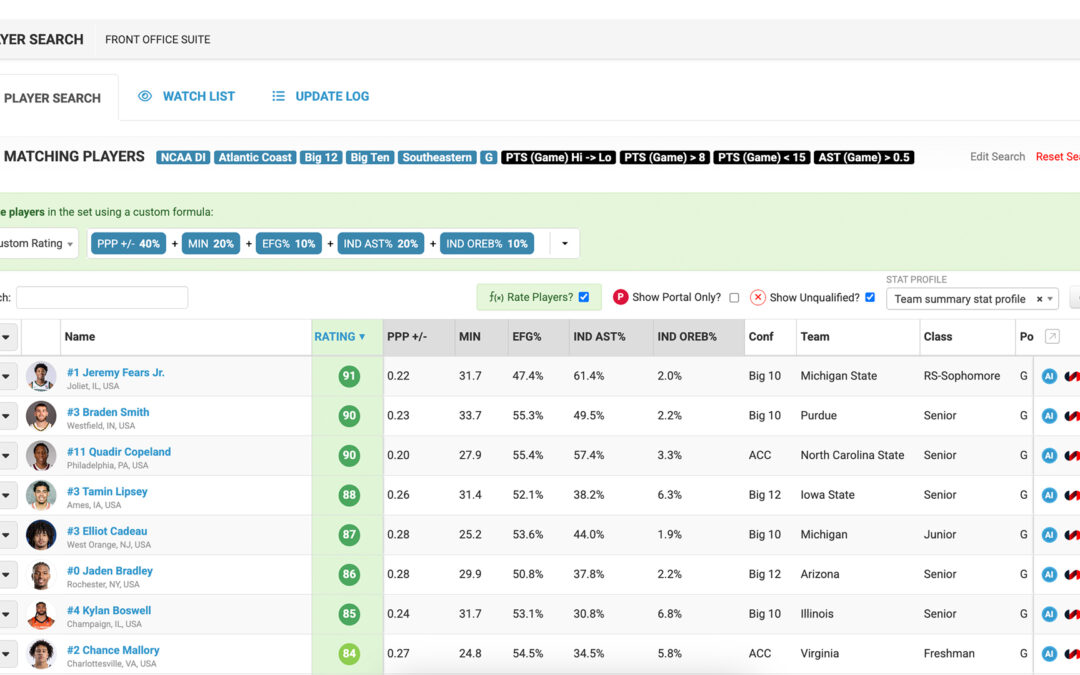
The concept is straightforward: you decide what matters. Offensive efficiency, usage rate, shooting quality, defensive activity, positional impact — choose the metrics that reflect how you play and what you value, then assign each one a weight. The platform does the rest, generating a rated, ranked list of players filtered to exactly the subset you’re evaluating.
But the model doesn’t stop at numbers.
Your judgment is the point. The model is the infrastructure for acting on it.
Alongside the statistical rating, coaches can layer in subjective evaluations — internal grades, scouting notes, qualitative assessments that capture what the numbers alone can’t. A player’s leadership in a film session. How he responds to being taken out. Whether his style of play actually translates to your pace. The analytics test and the eye test, finally in the same place.
Transparency and Control
The distinction worth naming is this: there’s a fundamental difference between being given a rating and building one. When you build the model, you know exactly what’s driving the score. You can interrogate it. You can adjust it. You can defend it in a staff meeting or to a GM who wants to know why a specific player ranks where he does.
That transparency isn’t just philosophically appealing — it makes for better decisions. When you understand the inputs, you can trust the output. When the formula is yours, the roster it builds is yours.
Just Play isn’t here to replace your analytics department. We’re here to support it — to give every staff, regardless of size or resources, the infrastructure to turn what they believe into a system that actually works.
Build the Board Before the Portal Opens
Here’s what the most prepared programs understand: the portal window is the execution of a year-round process, not the beginning of one.
With the 15-day transfer portal window arriving after the Final Four, staffs that haven’t been tracking players all season are already behind. Just Play’s Player Search allows coaches to search any player in the country — right now, regardless of whether they’re in the portal or not. Build a watchlist. Rate them against your model. Know where they stand before the window opens.
When the portal does open, you’re not starting from a blank screen. You’re executing a plan you built in March.
Search any player in the country. Build your watchlist now. Move first when the portal opens.
→ Explore Player Search and Watchlists in Front Office Suite
Roster Building Is a Year-Round Discipline
The landscape has changed. NIL, the transfer portal, expanded rosters, and compressed windows have transformed roster construction from a seasonal activity into a continuous one. The staffs winning that environment aren’t necessarily the ones with the biggest resources — they’re the ones with the best process.
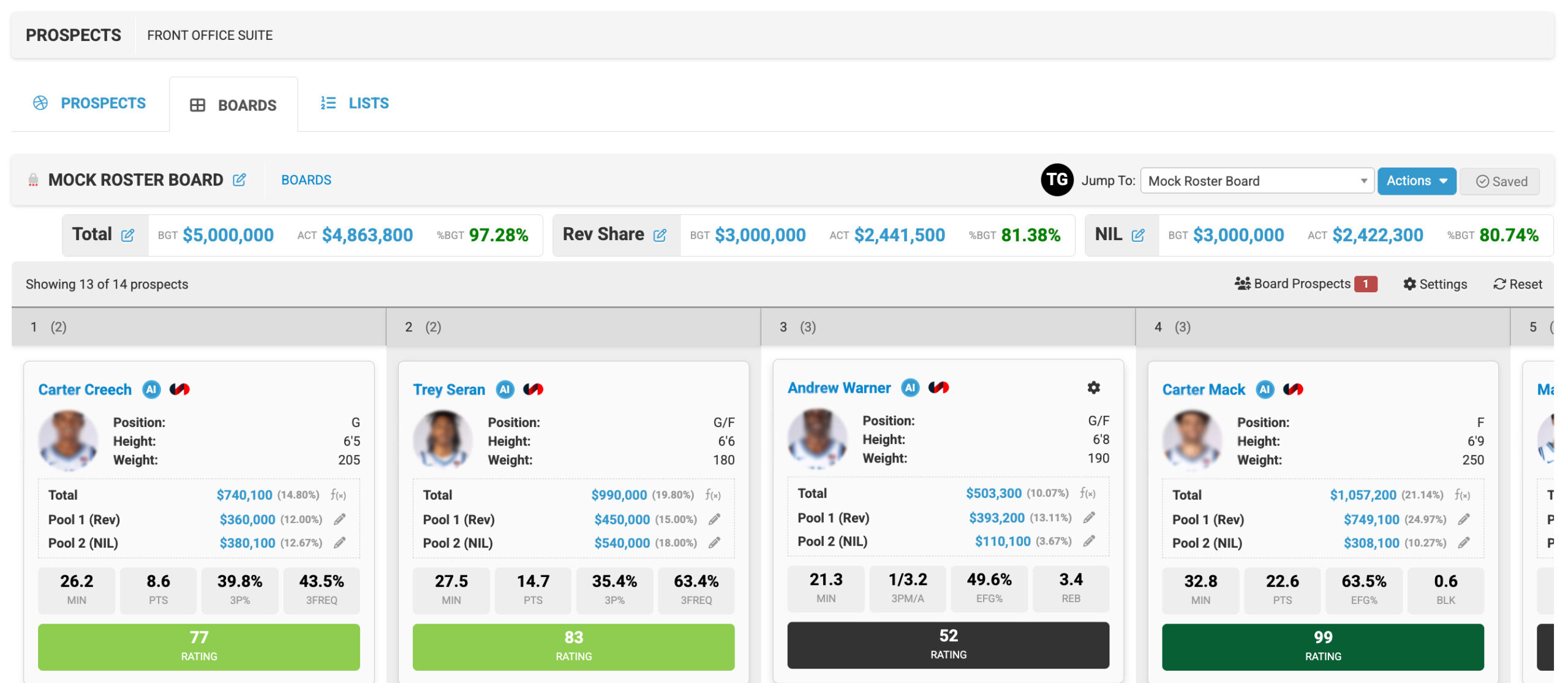
Custom Player Rating Models are part of a broader set of tools in Just Play’s Front Office Suite designed to support that process: prospect databases, boards and budgets, visit management, analytics integration, and Synergy video access — all in one place, connected to the same platform your staff already uses for game preparation.
The goal isn’t to replace your judgment. It’s to give your judgment a better infrastructure.
Ready to build your player model?
→ Read: Major Front Office Upgrades for Year-Round Roster Building